You don’t need a store to start selling memberships. The tier purchase button shortcode drops a working “Join this tier” button anywhere on your site, and it always points to the right place — automatically. Here’s how to use it.
Step 1 — Add the shortcode
Drop this onto any page, post, or widget — a pricing page, a blog post, a sidebar, or the footer of a gated article:
[yum_gc_tier_purchase_button tier_slug="gold" button_label="Join Gold — $9/mo"]Step 2 — Set the two required options
- tier_slug — the tier this button sells (use the slug, not the display name).
- button_label — the wording on the button. Always set this — left out, the button renders with no text on it.
Step 3 — Pick a display mode (optional)
- mode=”button” (default) — a styled button.
- mode=”link” — a plain text link.
- mode=”url” — the bare address with no HTML, handy inside your own button block or an email template.
Add button_class with your own space-separated CSS classes if you want the button to match your theme’s styling.
Where the button points
The button checks two places, in order: first the tier’s linked WooCommerce product (if there is one and it’s published), otherwise the tier’s Purchase page URL (set under Gate Content → Membership Tiers → open a tier). If neither exists, the shortcode prints nothing at all, so an unfinished tier never shows a broken button.
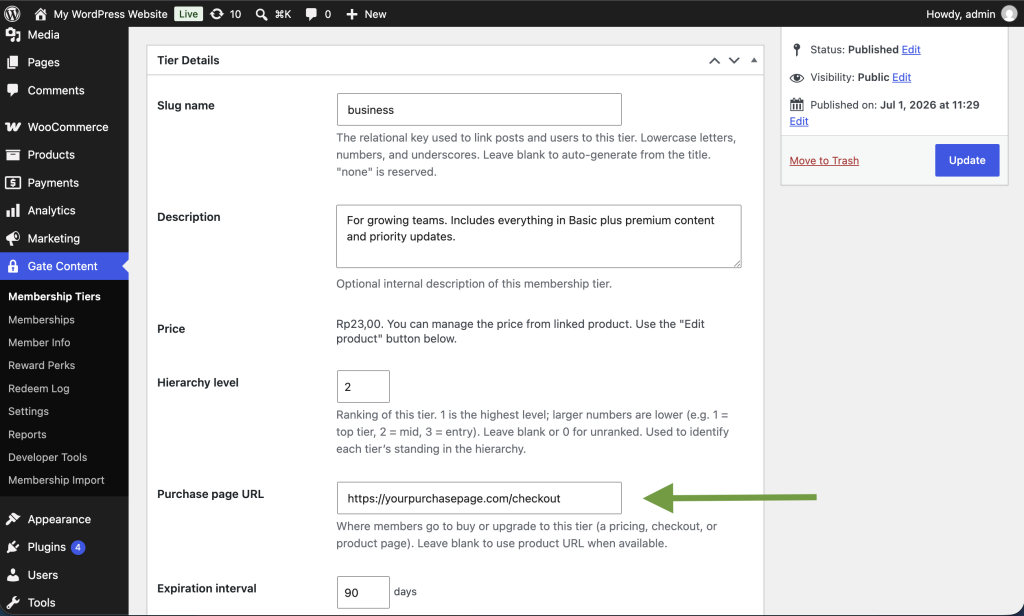
Selling without WooCommerce
With no WooCommerce installed, the button simply follows the tier’s Purchase page URL — which can point anywhere you like:
- An external checkout — PayPal, Stripe Payment Links, Gumroad, Lemon Squeezy, or a bank-transfer instructions page. Take the payment there, then grant the tier by hand (or by CSV import) under Gate Content → Memberships.
- An application or enquiry form, for invite-only or vetted memberships.
- A “how to join” page, for clubs or associations that collect dues offline.
The real win is that the link lives in one place. Put the shortcode on ten different pages, and when your checkout URL changes, update the tier once and every button follows — no hunting down old links.
Tip: pair it with a gate message or promo block so visitors read why they should join and immediately have a button to do it.